Local Weather Forecast - Radar
Vitality App StudiosWeather
4.716.20K Reviews
- Version
- 1.5.8
- Installs
- 10.00M
- Age Rating
- Everyone
Screenshots
Our Review of Local Weather Forecast - Radar
 Analysis by Appyee
I usually check the weather when I’m deciding whether to walk, drive, or change plans, and a forecast is only useful if I can get to it at the right moment. Local Weather Forecast - Radar is a weather app from Vitality App Studios that puts local conditions, forecasts, and radar in one place. Its appeal is the combination of a fairly approachable layout and tools for looking beyond the temperature. The experience still depends on having a working connection when you need fresh information, so I see it as a practical planning companion rather than a substitute for local emergency alerts or careful judgement during severe weather.
What connectivity changes in everyday use
A weather app’s most important job is helping me answer a simple question: should I take an umbrella, shift a run, or leave earlier? That answer relies on current information, and network access matters most when conditions are changing. With a connection available, I can check the local view, look at the radar, and compare what is happening now with the coming forecast. If service is slow or unavailable, I would avoid treating an earlier screen as a live picture of the sky. I check again when I have a reliable connection before making a decision that depends on a sudden change.
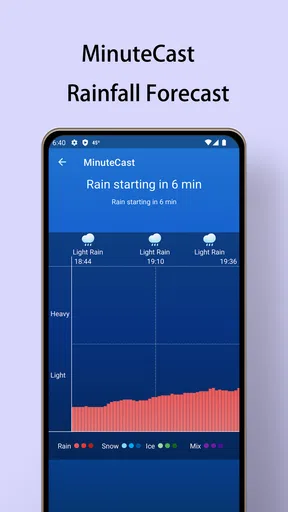
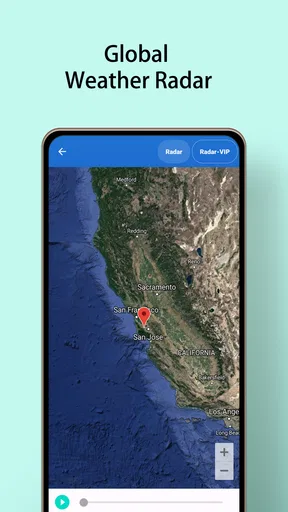
This is particularly relevant for radar. A map can make approaching rain easier to understand than a single icon, but it is only helpful when the information has loaded and is current enough for the decision at hand. I use it to judge whether a shower seems likely to affect an outdoor errand, not to assume that every patch of precipitation will arrive at my exact location or time. That distinction keeps the radar useful without asking it to promise more than a forecast can.
Useful checks before heading out
For a commute, I would check the local conditions before leaving and then use the forecast to think through the whole trip rather than only the temperature at departure. Wind and humidity can change how a day feels, while the UV index is worth considering for a long stretch outside. If I am travelling through areas with patchy reception, it makes sense to review the forecast while I still have a dependable connection. That is a sensible habit for any network-dependent weather service, not evidence that this app offers an offline mode.
Multiple locations are useful when a day involves more than one place. I might compare home with the area where I work, or check on relatives in another town before calling to suggest a plan. The practical tip is to keep the location list focused on places I actually need. A short list is quicker to scan, especially when I am checking in a hurry, and it reduces the chance that I mistake one town’s forecast for another’s.
First Impressions and Features
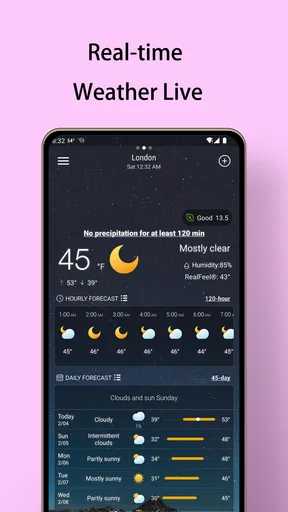
When I first opened the app, the interface was surprisingly clean and intuitive. I’m not a fan of apps that bombard you with loads of information at once, so this was a nice surprise. Right off the bat, you get a straightforward view of the current weather in your area. It’s like having your own personal meteorologist but without the dramatic flair.
One of the standout features is the real-time weather radar. You can literally see the clouds moving on the map, and it’s so detailed that you can track storm movements. It’s especially handy if you’re planning an outdoor activity and want to dodge a sudden downpour. Plus, it gives you a sneak peek at what’s coming up in the next few hours.
Reading forecasts with the right expectations
The word “real-time” can encourage people to treat a radar display as an exact, minute-by-minute guarantee. I would use it as a visual guide to nearby weather, then combine it with the forecast and what I can see outside. For a short walk, that may be enough to decide whether to bring a light layer. For a long drive or a safety-critical outdoor activity, I would consult more authoritative local guidance as well. Radar is most valuable as context: it can help explain why conditions may change, but it cannot remove uncertainty from local weather.
Another useful way to read the forecast is to match the detail to the decision. A broad weekly outlook is good for choosing which day might suit a picnic, but I would not plan the exact timing of an event from that view alone. As the day gets closer, I would check again and use the hourly or near-term information available in the app. This two-step habit helps avoid overcommitting to a long-range prediction while still making early planning easier.
Daily and Weekly Forecasts
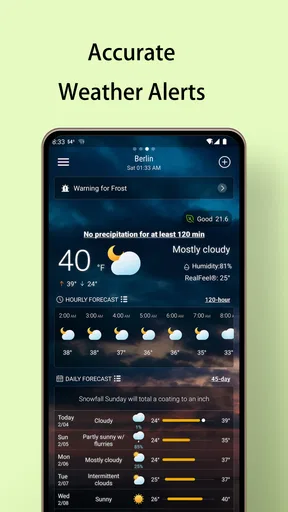
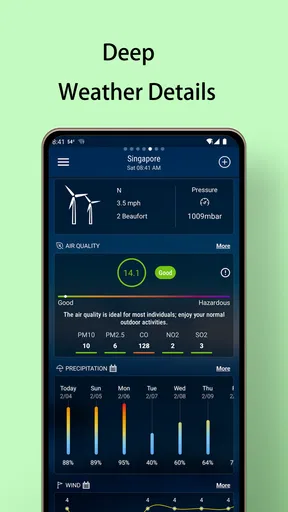
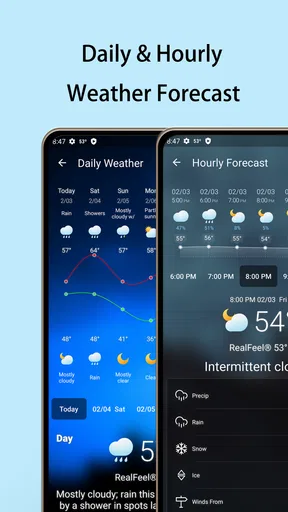
The app provides both daily and weekly forecasts, which I’ve found to be pretty accurate. It’s not just about temperatures—you also get insights on humidity, wind speed, and the UV index. Knowing the UV index is crucial if you’re planning a day at the beach, so hats off to the app for including that.
For an everyday example, imagine I have a morning appointment, a lunch break outside, and an evening walk planned. I would first check the conditions before leaving, then pay attention to wind and rain when deciding what to wear. Before the walk, I would look at the radar again if the sky seems unsettled. The UV index helps with a different decision: whether I should prepare for sun exposure even if the temperature feels comfortable. Using these details for separate choices is more helpful than glancing at one number and assuming it describes the whole day.
There is a trade-off between a quick glance and a careful check. If all I need is a rough sense of whether it is cold or warm, the current local view keeps things simple. If I am coordinating an outdoor gathering, I would take a moment to compare the daily forecast, wind, and radar rather than relying on a single headline condition. That extra check is worthwhile when several people’s plans are involved, but it may feel like unnecessary detail to someone who only wants a basic temperature readout.
The app’s average rating is 4.8 from around 188,000 ratings, and it has more than 10 million installs. Those figures suggest broad interest, but they do not tell me whether a particular forecast will suit every location or personal routine. Weather quality can vary by place and situation, so I would give the app a few ordinary days of use and see whether its local forecasts help with the decisions I actually make.
Speaking of forecasts, the app also sends notifications. Now, I’m not one to enable notifications for every little thing, but these are actually useful. They give you heads up about any drastic weather changes that might catch you off guard. It’s like having a friend whispering, “Hey, grab an umbrella today.”
Notifications and a calmer phone
Notifications are most useful when they help me act without turning the phone into a stream of interruptions. I would start with the weather alerts I genuinely want to notice and review whether they fit my routine after using the app for a while. Someone who spends much of the day outdoors may welcome more prompts than someone who already checks the forecast each morning. The right balance is personal: an alert should change a decision, not merely repeat information I have just seen.
If a notification arrives while I am travelling, I would open the app when I can do so safely and check the relevant location rather than making a rushed choice from the lock screen alone. That matters when I have several places saved, since an alert or forecast is only useful if I know which area it refers to. For driving, I would check before setting off or ask a passenger to review it; no forecast is worth handling a phone unsafely.
Customization and Personalization
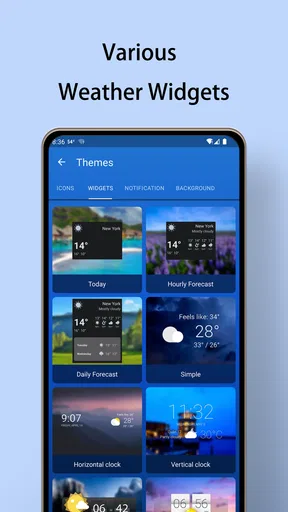
Customization is another area where this app shines. You can tailor the settings to show only the information you care about. For example, if you’re a runner, you might want to focus on temperature and humidity. The app lets you set your preferences, so you’re not overwhelmed with data you don’t need.
That kind of tailoring works best when it follows a real habit. A runner might care about how warm and humid a route will feel, while someone planning a day in the garden may pay closer attention to rain and sun exposure. I would avoid trying to display every available detail just because it is there. A focused screen is faster to interpret when I am heading out, and I can look deeper when the plan calls for it.
You can also add multiple locations. This is perfect if you travel often or have family in different parts of the country. Just swipe between locations to see the weather there. It’s like having a little weather station in your pocket for everywhere you care about.
For a trip, I would add the destination before leaving and compare it with home while I still have a good connection. That gives me a useful sense of how clothing or timing might need to change. On a busy travel day, I would keep the destination and home easy to distinguish and remove places I no longer need. This is a small organisational choice, but it makes location switching less error-prone when I am checking quickly.
Where it fits among weather apps
Compared with a phone’s built-in weather view, this app is appealing if I want radar and a more configurable set of weather details in the same routine. The built-in option may be enough for someone who only wants a quick temperature check and prefers not to maintain another app. At the other end, people who need specialist forecasting for a particular outdoor pursuit may prefer a dedicated service designed around that activity. I see this app as a middle ground: more than a glanceable temperature tile, without needing to turn every weather check into a technical exercise.
It is a good fit for people who regularly make small plans around local conditions: commuters deciding whether to carry rain gear, parents checking the weather near school, runners weighing up a route, or travellers comparing home and destination. It is less compelling for someone who never checks beyond the basic daily high and low, or for a user who needs professional-grade interpretation before making safety-sensitive decisions. In those cases, a simpler built-in forecast or a specialist source may be a better match.
One limitation of relying on any connected forecast is that the experience can be interrupted by weak reception, a slow connection, or a moment when I cannot comfortably use my phone. I plan around that by checking before a journey and not treating a screen already open for a while as confirmation of current conditions. If the app does not refresh promptly, I wait until I have a better connection and check again rather than guessing from stale information. That small pause is preferable to making a plan around a picture that may no longer reflect the weather.
Cost, compatibility, and who should try it
The app is free to download, with in-app purchases listed from $2.99 to $4.99 per item. I would begin with the free experience and decide whether it covers my routine before considering any purchase. That keeps the choice practical: if local forecasts, radar, and the available customization already answer my everyday questions, there is no need to spend simply because an optional item exists. It is also suitable for a general audience, with an Everyone content rating.
It runs on Android 6.0 or later, and the current version is 1.5.6. Before installing, I would check that my device meets that minimum and that I am comfortable using a weather app that depends on a connection for current information. The developer, Vitality App Studios, has built an app whose strongest case is its mix of a straightforward local overview and radar-oriented planning rather than a specialist toolkit.
The app has been available since January 22, 2021, and it has accumulated around 15,000 written reviews. I treat public feedback as a useful sign of how many people have tried it, not as a substitute for testing it against my own location. A short personal trial is the best way to learn whether the forecast timing and presentation suit the places I check most often.
Why It’s Worth Downloading
Now, you might be wondering why you should choose this app over others. The answer lies in its simplicity and accuracy. Many weather apps feel clunky and slow, but this one is different. It’s like it gets me and what I need from a weather app.
Also, the radar feature isn’t just a gimmick. It’s genuinely useful, especially if you’re someone who likes to plan their day around the weather. Plus, the option to personalize your dashboard means you can make the app work for you, not the other way around.
"The best weather app is the one that you don’t have to think about—Local Weather Forecast - Radar fits that bill perfectly."
In short, if you’re looking for a reliable, user-friendly weather app, give Local Weather Forecast - Radar a shot. It’s packed with features that actually matter, and it’s been a reliable part of my daily routine. So, go ahead, download it, and see how it fits into your life. You might just find it’s the weather app you didn’t know you needed.
Privacy and Permissions
See what permissions an app requests and how it handles your data.
- Location
- approximate location (network-based), precise location (GPS and network-based)
- Phone
- read phone status and identity
- Wi-Fi connection information
- view Wi-Fi connections
- Device ID & call information
- read phone status and identity
- Other
- view network connections, send sticky broadcast, connect and disconnect from Wi-Fi, full network access, run at startup, control vibration, prevent device from sleeping, read Google service configuration
Verdict
Strengths of Local Weather Forecast - Radar
- Accurate real-time weather updates.
- User-friendly interface with intuitive design.
- Customizable alerts for severe weather.
- Detailed hourly and weekly forecasts.
- Minimal battery consumption.
Limitations of Local Weather Forecast - Radar
- Limited features in free version.
- Ads can be intrusive at times.
- Radar updates can be slow.
- Requires constant internet connection.
- Occasional bugs in widget display.
Other Releases by Vitality App Studios
View All
Local Weather Alerts - Widget
Weather4.8
Similar Picks in This Category
View All
Weather - By Xiaomi
Xiaomi Inc.4.1

Weather & Radar Forecast
WetterOnline4.8

Weather
OneLouder Apps4.6

AccuWeather: Weather Radar
AccuWeather3.6

The Weather Channel - Radar
The Weather Channel4.6

1Weather Forecasts & Radar
OneLouder Apps4.3
Frequently Asked Questions
What features does the Local Weather Forecast - Radar app offer?
Local Weather Forecast - Radar provides real-time weather updates, detailed forecasts, and interactive radar maps. Users can access hourly and weekly weather predictions, severe weather alerts, and customizable notifications. The app also includes features like sunrise/sunset times and humidity levels, making it a comprehensive tool for weather tracking.
Is the Local Weather Forecast - Radar app free to use?
The app is available for free, offering basic weather features and updates. However, it also provides a premium version that includes additional features such as ad-free usage, advanced radar options, and more detailed forecasts. Users can choose to upgrade to enhance their experience and access more features.
How accurate is the weather information provided by the app?
The Local Weather Forecast - Radar app sources its data from reliable meteorological services to ensure accuracy. It offers real-time updates and uses radar technology to provide precise weather conditions. However, like all weather apps, slight discrepancies can occur due to rapidly changing weather patterns.
Can I customize the notifications in the Local Weather Forecast - Radar app?
Yes, the app allows users to customize their notifications. You can set alerts for severe weather conditions, daily forecasts, and specific weather changes. This feature ensures you receive timely updates tailored to your preferences, keeping you informed and prepared for any situation.
Does the Local Weather Forecast - Radar app work offline?
The app primarily requires an internet connection to provide real-time updates and radar images. However, once you've downloaded the latest forecast, you can access some information offline. For the most accurate and up-to-date data, it's recommended to use the app while connected to the internet.
